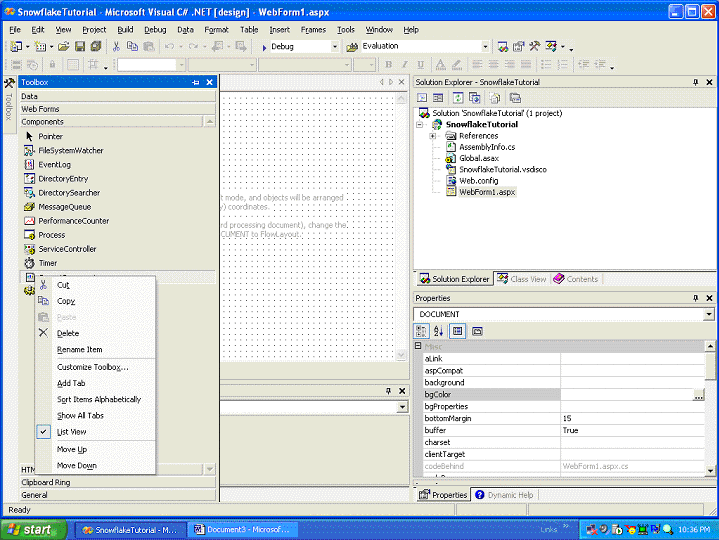
One of the easiest ways to gain easy access to the Snowflake.net control is to add it to the toolbox in the components section. To do this, expand the toolbox by hovering the mouse over it, right mouse button click in the toolbox panel and select the Customize Toolbox option.
You can add references to com and .net components in the toolbox. Snowflake.net is well, a .net component. Click on the Browse button in the .net frameworks tab and select the SnowflakeControl.dll from the location where you have installed the Snowflake.net control.
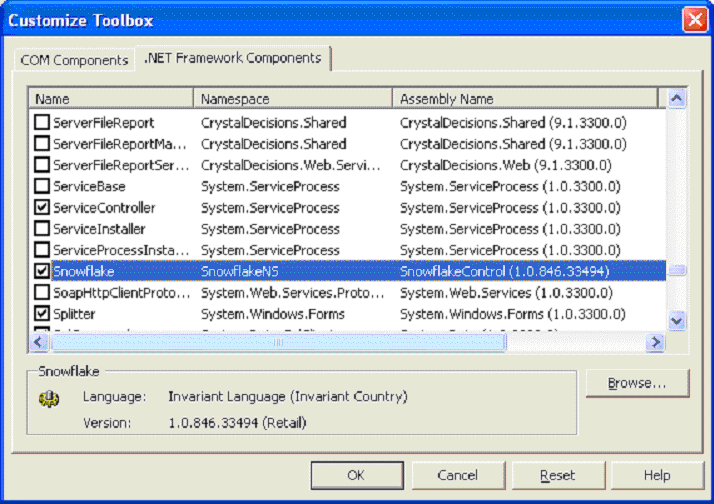
The control will now show up in your Toolbox->Components section. Visual Studio will automatically add the appropriate references to the project whenever you use the Snowflake.net control within your web pages.
|
|