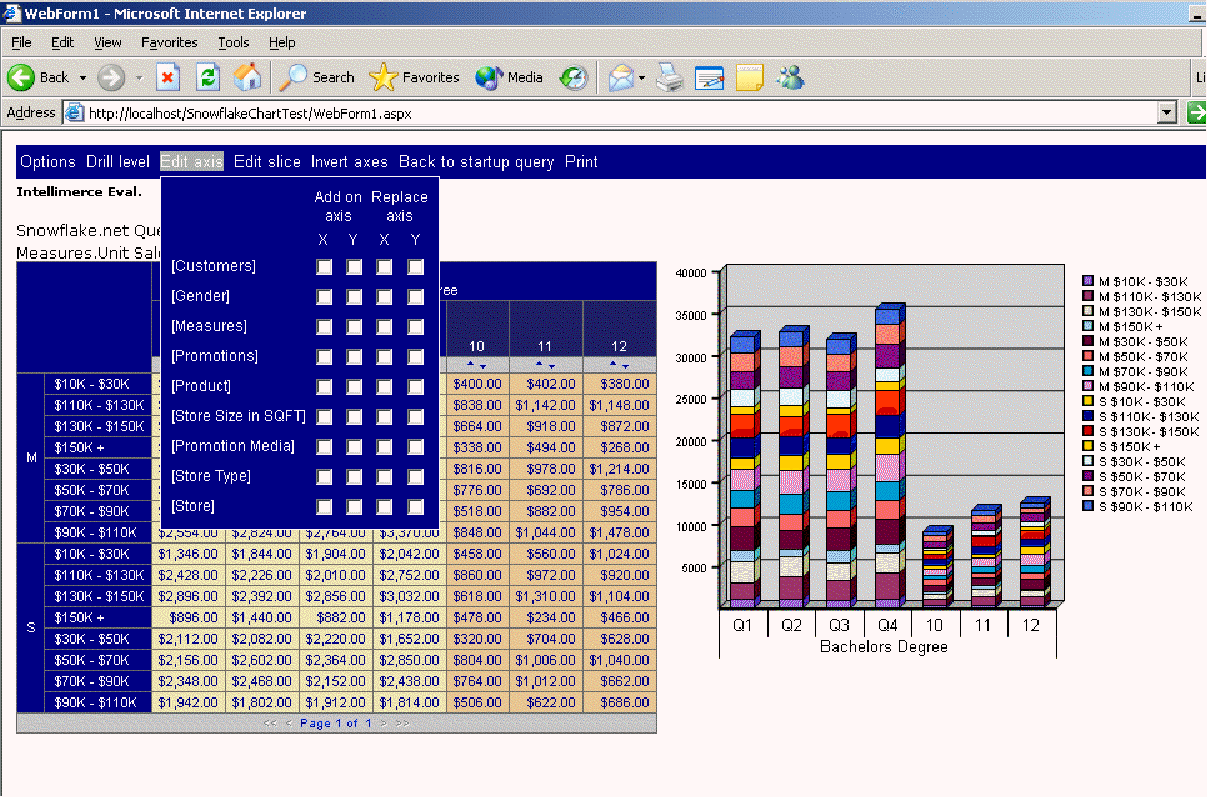
Starting with the release of Snowflake.net version 2.0, we have added the charting capabilities with 14 different chart types:
· Column
· Column3D
· ColumnStacked
· ColumnStacked3D
· Bar
· Bar3D
· BarStacked
· BarStacked3D
· Pie
· Pie3D
· Line
· LineWithMarkers
· Area
· AreaStacked
From display perspective version 2.0 also introduces automatic shading of the cells, as the user drills deeper into the dimension. Here is an example:
Figure 1 Snowflake.net in an asp.net page showing synchronized grid and chart view with Edit Axis menu activated.
In addition the version 1.8 added the sorting and paging capabilities while version 1.5 added the MenuVisible and CurrentQuery properties.
The menu viewed by the user now has 2 additional options: Chart Type and Page Size. Chart Type allows the user to select from the available chart types, while the Page Size option controls the number of rows displayed per page.
Charts are generated dynamically from the result-set and can be positioned relative to the grid, and can be one of 14 different chart types. As the user performs actions in the grid, the chart is refreshed appropriately (synchronized views). User can also perform drill-in (zoom) directly within the chart.
The dimensions that are presented on the x-axis are shown on the x-axis within the chart, with the exception of the pie-chart, which does not have the x-axis. The dimensions presented on the y-axis in the grid are displayed through different colors.
Here are the new properties of the Snowflake.net version 2.0 grouped by major functionality:
Caption - specifies the caption/title of the query
CaptionFont - specifies the font for the caption
CurrentSliceVisible - display the currently selected slices above the grid
CurrentSliceFont - specifies the font for the currently selected slice text
VerboseErrors - show full MDX if any error occur
DataGridVisible - display data grid
ChartType - 14 different chart types including 3d bar, stack, pie
ChartBckColor - background color for the chart
ChartImageFormat - gif, jpg, png, bmp, ...
ChartImageSubfolder - location for temporary storage of the chart generated images
ChartPosition - bottom, top, left, right relative to grid
ChartSize - chart size in pixels
ChartVisible - display the chart
Because the charting sub-component is generating the output files to the ChartsTemp directory (this is the default, you can change the directory if you wish) following security changes have to be applied for various scenarios:
UNAUTHENTICATED
· web.config should have impersonate="false";
· aspnet local account (account that executes the asp.net processes) must have read/write/delete rights on ChartsTemp.
INTEGRATED WINDOWS with users credentials
· User must have read/write/delete rights on ChartsTemp directory
INTEGRATED WINDOWS with specific credentials
· Specified user must have read/write/delete rights on ChartsTemp directory
Note that the generated charts are deleted after they are not longer needed, thereby not using the space in the ChartsTemp directory needlessly.
|
|