· Display of query results in design view in VS.net
· Context menus - clicking on dimension members presents dimension specific menu; clicking on data cells shows cell specific menu.
· Remove dimension capability added. Remove dimension option shows up in the context menus.
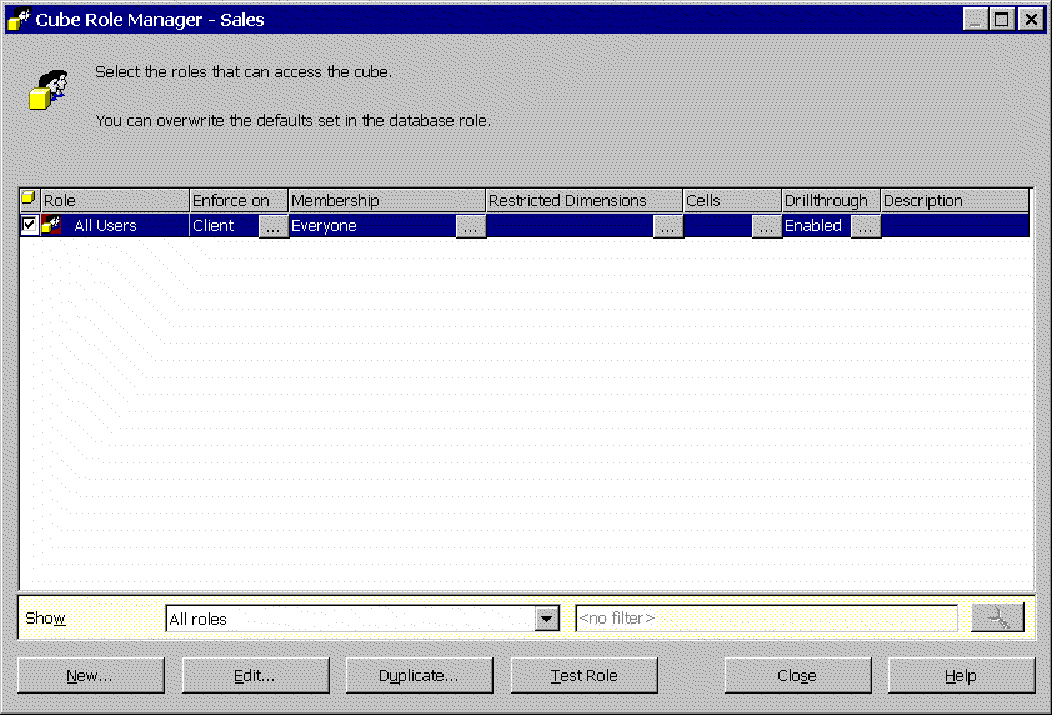
· Drill-through capability added (activated through context menu). To enable drillthrough set the DrillThroughEnabled property to true. Note that you have to have all the security settings for accessing the drill-through properly set (e.g. for Foodmart the directory that contains the mdb file must have the rights granted to asp.net). Also check that you have the role enabled for drill-through in the manage roles for the cube as shown in following figure:
· BeforeUIAction & AfterUIAction events.
In EventArgs you can find following properties:
- action performed (ZoomX, ZoomY, DrillDownX, InvertAxes, DimBrowserDrillDown...)
- actionPara (usually full member name)
- queryChanged (bool; some actions, like browsing hierarchy, do not change the query).
Here is an example that catches all SF UI actions, and displays them in multiline TextBox1. There will be "!" mark prior to actions that change query.
Don't forget to wire event through Snowflake property page.
Here are some page event examples:
private void Snowflake1_BeforeUIAction(object sender, System.EventArgs e)
{
SnowflakeNS.Snowflake.BeforeUIActionEventArgs ee= (SnowflakeNS.Snowflake.BeforeUIActionEventArgs) e;
if (ee.Action=="EditSlice" & ee.ActionPara=="[Gender]")
{
ee.Cancel=true;
ee.CancelExplanation="Performed action is forbidden";
// CancelExplanation will be displayed on the top of the Snowflake control
// if VerboseErrors desgin-time property is set to true
}
}
private void Snowflake1_AfterUIAction(object sender, System.EventArgs e)
{
SnowflakeNS.Snowflake.AfterUIActionEventArgs ee=(SnowflakeNS.Snowflake.AfterUIActionEventArgs)e;
if (ee.QueryChanged)
this.TextBox1.Text+="! ";
this.TextBox1.Text+=ee.Action + " " + ee.ActionPara+"\n";
}
· SF Language design-time property is replaced with Appearance->Culture property (drop down list). Format for totals use this property as well as language. Note that this property deprecates the language property.
· DesignTime property DataGrid->OnClickMemberAction; available options are "zoom" and "isolate".
· Chart area size/position is changing dynamically now to ensure enough space for large values on the value axis.
· Totals formatting is updated to include thousands separator when data cells contain integers.
· Slice members back/fore color was fixed to gray/black, now you can change it via following design-time properties:
SlicePanel->SliceMemberBackColor
SlicePanel->SliceMemberForeColor
· New design-time property: Appearance->BackButtonEnabled (bool, default=false)
Set this property to true to enable "go back" functionality without using Snowflake menu. Back button (left arrow) become visible when an UI action is performed. If last performed action is zoom (drill-in), back button is replaced with the name of the zoomed member.
· Advanced slice by member
Choosing a slice member in a tree-like manner is available now. Slice browser can be started from slice panel or from Snowflake menu (Edit slice option).
New design-time properties group "Slice Panel" holds new and updated properties and replaces old DimBrowserStyle group.
- SliceVisible (bool) - default is changed from "false" to "true" due to increasing importance of slice panel.
- NonDefaultMembersOnly (bool) - in the MDX world, all hierarchies not on data axes are on the slicer axis.
However, if no explicit slice is defined, slice member is default member for the hierarchy. If this property is "true", only non-default members are displayed in slice panel. Only exception is "Measure" hierarchy - it's always displayed. A drawback of NonDefaultMembersOnly=true is that you can add new slice only from menu. Set this property to "false" if you want complete slice control from slice panel.
- SliceForeColor
- SliceBackColor
SliceBrowser appearance is controlled via following properties:
- BrowserForeColor
- BrowserBackColor
- BrowserFont
After selecting slice member for browsing, SliceBrowser will be open under current slice member when exists in SlicePanel. Otherwise, SliceBrowser position is top-left datagrid corner.
Technical notes:
Fetched hierarchies members are cached in the session object. Browsing of members that are already fetched does not cause a new roundtrip to XMLA service. However, it causes roundtrip to web server. Beside members, drilled state for each member is cached too, so SliceBrowser will open hierarchy tree next time in the same view. Snowflake does not cheat about expand member links - they are displayed only when member has children.
· Hide row/column
New design time properties in DataGrid section:
- ColsRemovingEnabled (bool)
- RowsRemovingEnabled (bool)
· Back to previous query
Snowflake menu is changed - new submenu "Go back" is added, "To startup query" is relocated in new submenu, and "To previous query" item is added. Snowflake now holds a stack of executed queries, so user can "go back" as menu times as he want. This option is especially useful after executing irreversible operations such as "zoom" or "add hierarchy on axis".
· New & updated design time properties:
DataGrid section:
- MembersNamesWrap (bool)
- MaxMemberNameLen (int, default 0, when n>0, members names are truncated to n chars)
- SortingEnabled property renamed to RowsSortingEnabled
- ColsSortingEnabled (bool)
· some public properties are removed from Snowflake property window (CurrentQuery, XMLAResponse)
· some inherited properties are removed (wrap, tooltip)
· resolved bug: bad formating of long member names on chart category axis when display format is vertical and multiline.
· Subtotals for rows and columns - note that there is no sorting supported on the total columns; this would have to handled through the MDX statement (I assume that this is because the totals are not part of the MDX statement and it would require a significant rewrite to incorporate sorting on fields that do not come from the MDX statement)
There are 5 new design time properties (DataGrid section):
- SumColumns (bool)
- SumRows (bool)
- TotalsForeColor
- TotalsBackColor
- BoldTotals
· Current XML dataset exposed as property
New run-time property XMLAResult (return type is XMLElement), returns the XMLA response. One should take into account that on the first roundtrip this property returns null. Here is an example of usage
private void Page_Load(object sender, System.EventArgs e)
{
if (Snowflake1.XMLAResult!= null)
this.TextBox1.Text=Snowflake1.XMLAResult.InnerXml;
}
|
|